AI Power

Connect EShopSet MCP to your favorite AI agent and operate SEO Performance Monitor, AI Presence, and Data Sync in plain language.

EShopSet MCP lets external AI agents query and act on the same Shopify daily-ops apps you already run—SEO Performance Monitor, AI Presence, and Data Sync. Inside Shopify Admin, those apps also work with Sidekick—Shopify’s built-in assistant—via shared data and actions.

Works with your favorite agents

Use Sidekick in Admin, or connect MCP from tools you already live in. Connect once, then ask in plain language.

  • Sidekick

    Shopify’s built-in Admin assistant—EShopSet shares app data and actions with it.

  • Cursor

    Ask in the IDE while you ship store work.

  • Claude

    Desktop chat or Claude Code for daily ops.

  • ChatGPT

    Connectors / MCP for store questions.

  • Gemini

    Gemini apps and CLI store check-ins.

  • Copilot

    Stay in VS Code with MCP tools.

Add the integration in a few clicks

Sidekick works inside Shopify Admin with shared app data and actions. External agents use MCP / Connectors: add EShopSet, authenticate your store, then chat. Step-by-step: Connect EShopSet MCP · MCP features.

  1. 1

    Open MCP / Connectors

    In your agent, open Settings (or Customize) and go to MCP, Tools & MCP, or Connectors—wherever your client lists integrations.

  2. 2

    Add EShopSet

    Click Add / Add custom connector, pick EShopSet MCP (or paste the server URL from your EShopSet account), then confirm.

  3. 3

    Authenticate your store

    Sign in and link the Shopify store where SEO Performance Monitor, AI Presence, and Data Sync are enabled.

  4. 4

    Ask in plain language

    Start a chat and try a prompt below. Your agent uses EShopSet tools when the question needs store data.

Sidekick

  1. Install EShopSet and enable SEO Performance Monitor, AI Presence, and/or Data Sync on your Shopify store.
  2. In Shopify Admin, open Sidekick and allow EShopSet to share data and actions when prompted (or from the app’s Sidekick / permissions settings).
  3. Ask Sidekick about your EShopSet apps—the same Overview-style questions you would ask an external agent.

Cursor

  1. Open Customize → MCPs (or Settings → Tools & MCP).
  2. Browse or search for EShopSet, then click Add to Cursor—or Add custom MCP and paste your server URL.
  3. Approve auth if prompted. Agent can use EShopSet tools on the next chat.

Claude

  1. Open Customize → Connectors (Desktop: Settings → Connectors).
  2. Click + → Add custom connector, enter the EShopSet MCP URL, then Add.
  3. Click Connect and finish authentication for your store.

ChatGPT

  1. Open Settings → Connectors (or Apps & connectors, depending on your plan).
  2. Add a custom MCP / connector with your EShopSet server URL.
  3. Enable it for the chat, authenticate, then ask about your Shopify apps.

Apps your agent can use

MCP brings your first-release Shopify apps into the conversation—ask for status, trends, and safe next steps.

SEO Performance Monitor

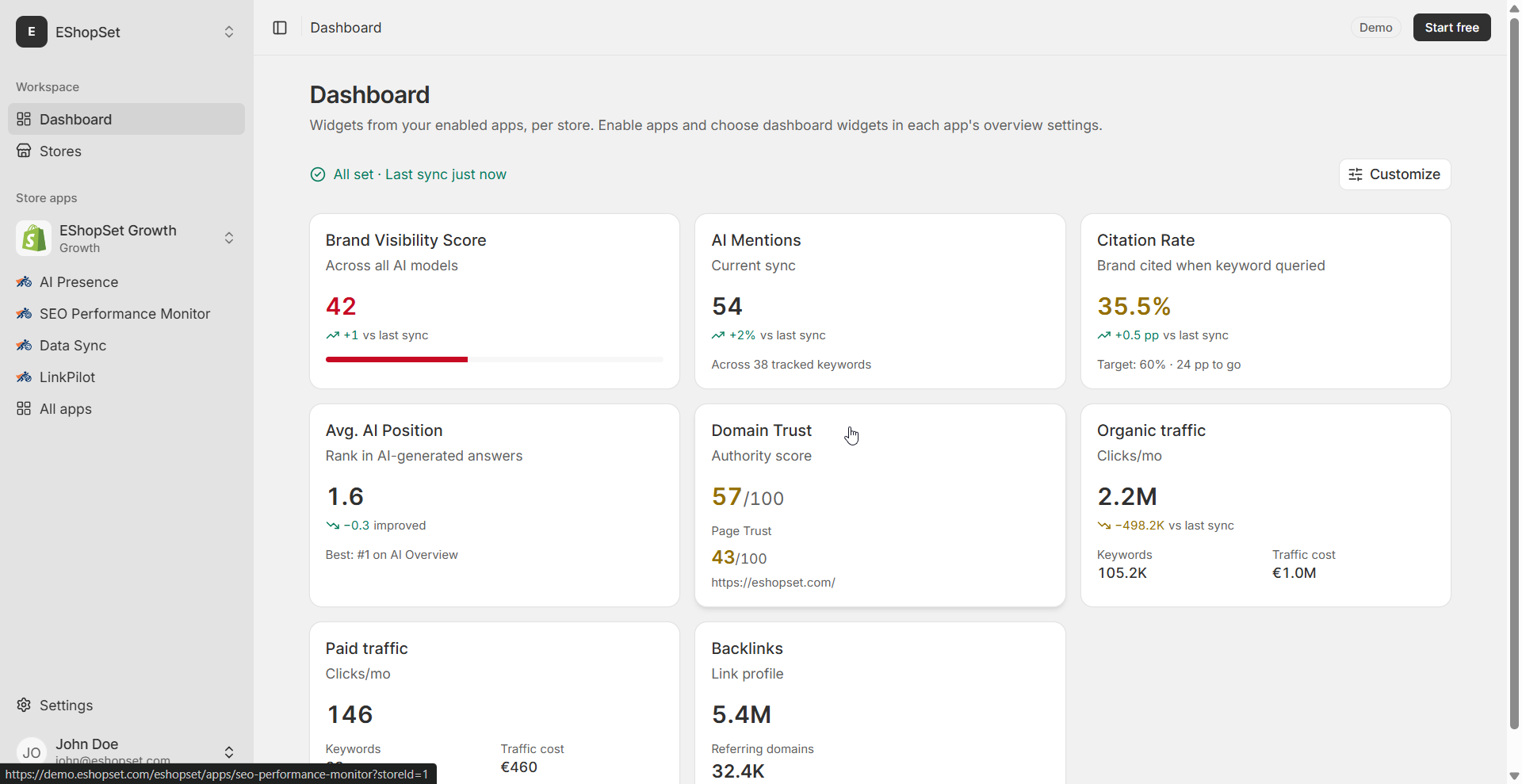
Get a daily SEO brief in chat and answer “what changed?” without hopping between SEO suites.

View app

What the app does

  • Domain & page trust scores
  • Organic & paid traffic trends
  • Ranked keywords with position change
  • Competitor overlap and top pages
  • Daily sync + job logs

What your agent can do

  • Pull trust, traffic, keyword, and competitor snapshots
  • Summarize position changes since the last sync
  • Explain Overview KPIs without opening Admin

Example prompts

  • Summarize my SEO Performance Monitor Overview and flag keyword drops this week.
  • Which competitors gained the most shared-keyword overlap since last sync?
  • List my top organic pages by traffic and note any that fell more than 20%.
  • What is my domain trust trend over the last 30 days?

AI Presence

Keep AEO/GEO status in your agent workflow so citation gaps surface before they hit revenue.

View app

What the app does

  • Brand visibility score
  • Mentions & citation rate
  • ChatGPT, Gemini, Perplexity, AI Overviews
  • Mentions by model and competing domains
  • Per-keyword mention table

What your agent can do

  • Report visibility score and citation rate
  • Break down mentions by model
  • Call out competing domains gaining share

Example prompts

  • How is my brand cited across AI models this week, and which competitors appear more often?
  • Which tracked queries mention my brand in ChatGPT but not in Perplexity?
  • Show my AI Presence visibility score trend and the lowest-performing keywords.
  • Which competing domains are cited most often next to my brand?

Data Sync

Update the catalog from natural language with fewer Admin clicks—and keep preview safety in the loop.

View app

What the app does

  • Connect Google Sheet
  • Map columns to Shopify fields
  • Match by SKU, handle, ID, or barcode
  • Preview before apply
  • Scheduled sync with safe policies

What your agent can do

  • Check sync status and recent Logs
  • Guide mapping and match-key choices
  • Run or review preview before apply

Example prompts

  • Preview my Data Sync job against the Google Sheet and tell me what would create vs update.
  • Did the last scheduled Data Sync succeed? Summarize any errors in Logs.
  • Which match key should I use if my sheet has SKUs but not Shopify product IDs?
  • Before I apply, how many rows would archive under my current removal policy?

Frequently asked questions

Quick answers about MCP, agents, and how merchants use AI Power day to day.

Ready to run Shopify ops from chat?

Install EShopSet on Shopify, enable the three apps, then connect MCP from your favorite agent.

See pricing

Run Shopify ops from your AI agent

Enable SEO Performance Monitor, AI Presence, and Data Sync on Shopify—then use EShopSet MCP from Cursor, Claude, ChatGPT, and more, plus Shopify Sidekick in Admin.

EShopSet Shopify apps catalog

We use cookies to improve your experience and analyze traffic. Read our Privacy Policy.